Why Windows 11 Home is the Ultimate Upgrade for Your PC
In the ever-evolving world of technology, staying up-to-date with the latest operating system is crucial for maximizing your PC’s potential. Microsoft Windows 11 Home is the latest offering from Microsoft, and it brings a host of new features and improvements that make it the ultimate upgrade for your PC. Here are some reasons why you should consider upgrading to Windows 11 Home:
1. Sleek and Modern Design
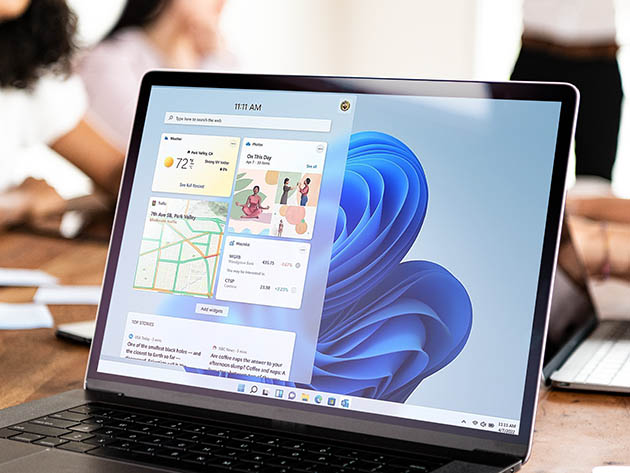
Windows 11 Home introduces a fresh, modern design that enhances the overall user experience. With its centered Start menu, rounded corners, and new icons, the interface feels more intuitive and visually appealing. The new design not only looks great but also improves productivity by making it easier to navigate and find what you need.
2. Enhanced Performance
One of the standout features of Windows 11 Home is its improved performance. The operating system is optimized to run faster and more efficiently, ensuring that your PC operates smoothly even when running multiple applications. With better memory management and reduced background processes, you can expect a noticeable boost in speed and responsiveness.
3. Advanced Gaming Capabilities
For gamers, Windows 11 Home is a game-changer. The new DirectStorage technology significantly reduces load times, allowing you to jump into your favorite games faster than ever before. Additionally, Auto HDR enhances the visual quality of games, providing more vibrant colors and better contrast. With support for DirectX 12 Ultimate, you can enjoy the latest gaming technologies and experiences.
4. Improved Multitasking
Windows 11 Home introduces new multitasking features that make it easier to manage multiple applications and tasks simultaneously. The Snap Layouts and Snap Groups features allow you to organize your open windows into different layouts, making it simple to switch between tasks. Virtual Desktops have also been improved, giving you more flexibility in how you organize your workspaces.
5. Enhanced Security
Security is a top priority with Windows 11 Home. The operating system includes several new security features to protect your data and privacy. Windows Hello provides a faster and more secure way to log in using facial recognition or fingerprint scanning. Additionally, the built-in Windows Defender offers robust protection against malware and other threats, ensuring that your PC remains safe and secure.
6. Seamless Integration with Microsoft Services
Windows 11 Home seamlessly integrates with Microsoft services such as OneDrive, Microsoft Teams, and Microsoft Edge. This integration allows you to easily access your files, collaborate with others, and browse the web with enhanced security and performance. The new Widgets feature also provides personalized news, weather, and other information at a glance, keeping you informed and connected.
Conclusion
Windows 11 Home is more than just an operating system upgrade; it’s a complete transformation of the PC experience. With its sleek design, enhanced performance, advanced gaming capabilities, improved multitasking, enhanced security, and seamless integration with Microsoft services, Windows 11 Home is the ultimate upgrade for your PC. Don’t miss out on the opportunity to take your computing experience to the next level.
Microsoft Windows 11 Pro:Activation for Up to 3 PCs